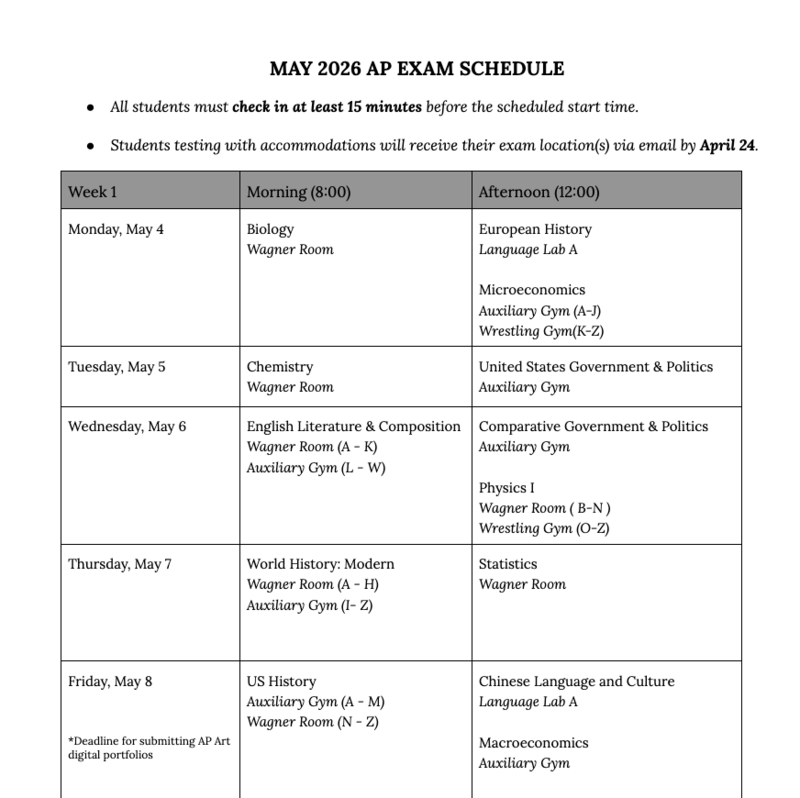
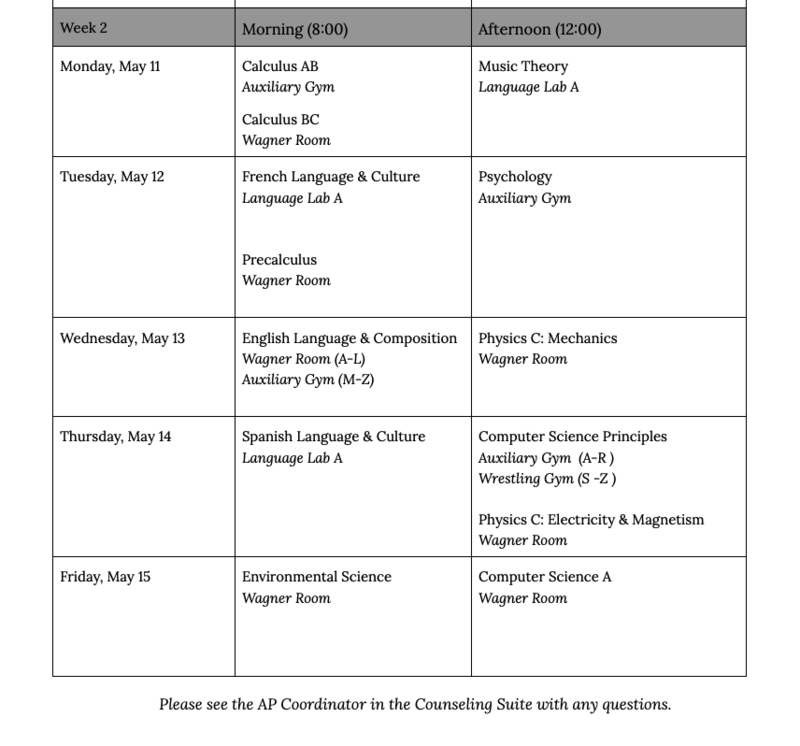
Please see below for the AP Exam Schedule and related information:
AP Exam Schedule and Room Assignments
View the full NCHS 2026 AP Exam Schedule with Room Locations
Students who are testing with accommodations will receive a separate email by April 24 with their specific testing locations.
Note about accommodations:
College Board is allowing students with extended time accommodations to end test segments before the full time has elapsed. All students must complete the standard time limits at a minimum. If your child has extended time, we encourage a family conversation about how to best use their time during testing.
Attendance
Exam rosters have been shared with the attendance office. Students are required to attend classes that meet before or after their scheduled AP exams.
What to Bring
Please review: What to Bring on AP Exam Day
AP Exam Terms and Conditions
Students must review and agree to the 2026 AP® Exam Terms and Conditions before taking their exams. This agreement outlines key rules and policies.
For AP courses with a portfolio submission (AP Art and Design & AP Computer Science Principles), students will need to accept the Digital Portfolio AP Exam Terms and Conditions before finalizing their work in the AP Digital Portfolio.
One Free Score Send – Action Required
Students will be prompted in My AP to select a recipient for their free AP score report before accessing their dashboard.
Seniors must make a selection to continue accessing AP Classroom and course materials.
Students receive one free score send each year, including all past and current AP scores.
Colleges may use scores for credit/placement and to share admissions or scholarship information.
Students can choose a likely school, opt out, or update their selection anytime before June 20, 2026.
Score reports will be sent in July and include all AP scores.
Reminder for AP Exam Day:
Please make sure your device is fully charged before arriving. Students may bring their chargers as well, but they should not rely on being able to charge during the exam. A fully charged device helps avoid disruptions or delays and ensures a smooth testing experience for everyone!
Reminder for Students: Sign In to Bluebook:
If you are using a personal device for a digital AP Exam, please follow these important steps to be prepared:
Download Bluebook: Make sure the Bluebook app is installed on your device well before exam day.
Sign In and Preview: Log in and explore the test preview features so you know what to expect.
Important Bluebook Update for Digital AP Exams
Students taking digital AP exams will need to manually enter their login credentials when accessing Bluebook—autofill will not work.
✔ Why This Matters: Relying on autofill may cause delays or login issues on exam day.
✔ What Students Should Do: Practice logging in manually before exam day to avoid disruptions.
Check Your Exam List: Once signed in, confirm that all of your digital AP Exams appear on your Bluebook homepage.
If you don’t see an exam listed, please contact us right away so we can confirm your exam order. You can email the AP Coordinator directly at apcoordinator@ncps-k12.org.
On Exam Day: When you open Bluebook, you’ll see a button to begin check-in for your scheduled exam.
To Help Prevent Tech or Security Issues During Testing:
Close all apps and windows before launching BlueBook
Remain in the secure testing environment until they see the submission confirmation screen with confetti
Avoid opening any other apps or websites during the exam—even if they believe they’ve submitted
These simple steps help ensure a smooth testing experience and avoid the need for retesting due to security flags or submission concerns.